
Last reviewed: 2026-10-27. Facts about the other apps come from their App Store listings, read on that date in the US App Store.
Disclosure. This page is written by the developer of Teleprompter: Video & Captions, which is one of the six apps compared. Its facts come from the app itself, version 2.1, and its limits are listed as plainly as the other apps’ features. The other five apps were not installed or tested; everything about them comes from their own App Store listings.
What decides the fit
Seven questions decide which iPhone teleprompter app fits a given setup, and not every question matters for every setup.
- Where is the camera? If the iPhone records you, the script has to sit over the camera picture, close to the lens. If a separate camera records through a rig, the phone only shows the script.
- How should the script move? At a fixed speed, by following your voice, or either. Voice tracking helps only in a language the app can follow.
- Do you use beam-splitter glass? Then the app has to mirror the script. Without glass, mirroring does not matter.
- Is the phone out of reach during a read? Remotes, keyboards, foot pedals or a second device matter when you cannot touch the phone.
- What happens after the take? Captions, trimming, cropping, background changes, and where the finished video goes.
- Where do your scripts live? On the phone, in files, in cloud storage, or synced between devices.
- How do you want to pay? A paid download, a one-off purchase or a subscription, and what you can do before you pay.
The apps compared
The six apps on this page are named with the developer shown on the App Store. Teleprompter: Video & Captions comes first because this is its developer’s site; the others follow in alphabetical order, and the order is not a ranking.
- Teleprompter: Video & Captions, by Nawal Amallou
- BIGVU Teleprompter Captions AI, by BIGVU INC
- Prompt+ Teleprompter, by Norton Five Ltd
- PromptSmart Pro – Teleprompter, by PromptSmart
- SpeakSync, by Malcolm Taylor
- Teleprompter.com, by Teleprompter LLC
Recording and scrolling
Recording and scrolling matter first when you film with the iPhone itself.
| App | Records video in the app | Camera | Voice tracking | Fixed-speed scroll |
|---|---|---|---|---|
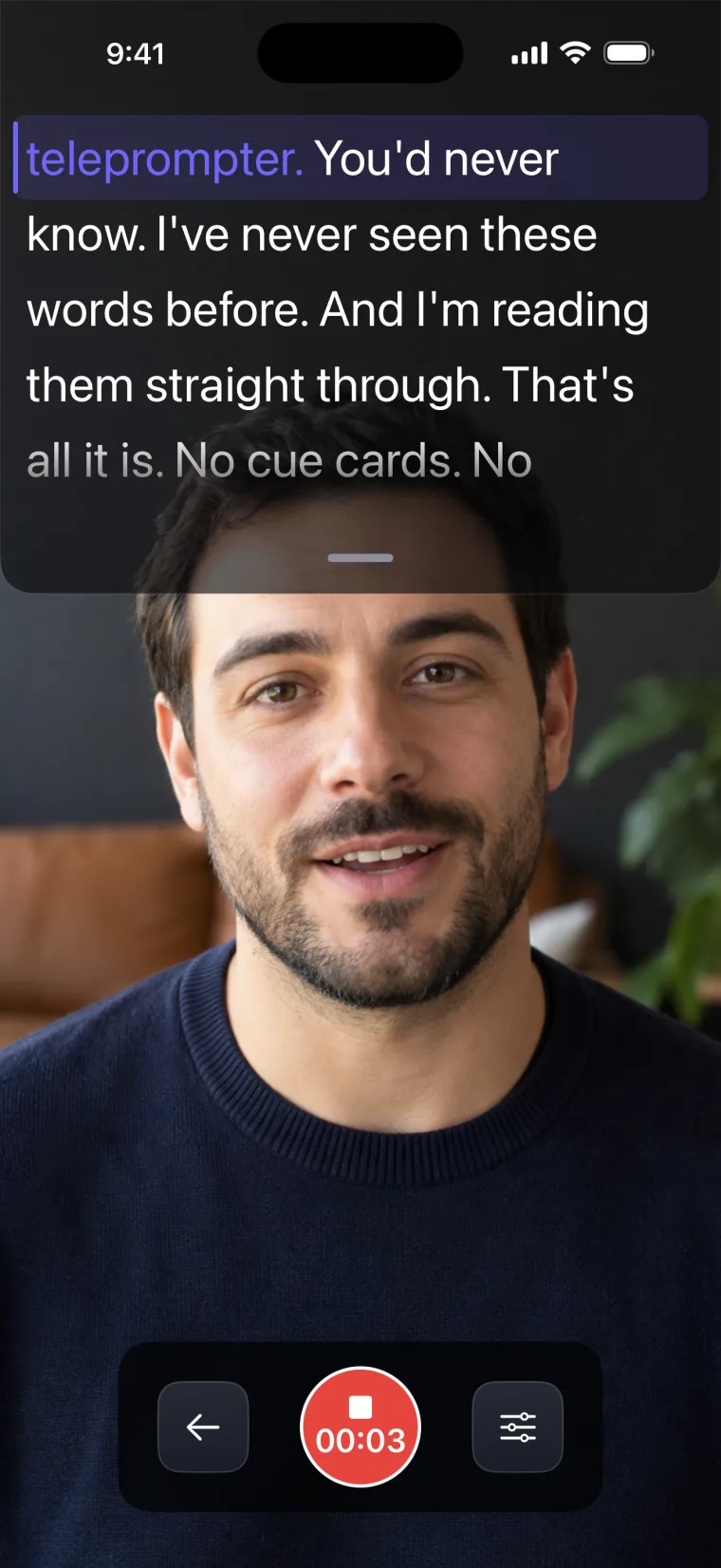
| Teleprompter: Video & Captions | Yes, with the script in a window over the camera picture | Front only | Yes, in nine languages | Yes, set on a scale from 1 to 50 |
| BIGVU Teleprompter Captions AI | Yes | Front and rear | Not stated | Yes |
| Prompt+ Teleprompter | Not stated | Not stated | Yes; languages not stated | Yes |
| PromptSmart Pro – Teleprompter | Yes, in Selfie Mode, with the text next to the camera | Not stated | Yes (VoiceTrack), English only | Not stated |
| SpeakSync | Not stated | Not stated | Yes; the listing says it works in more than 30 languages | Not stated |
| Teleprompter.com | Yes, with pause and resume | Front and rear, switchable during a recording | Yes (VoiceGlide); languages not stated | Yes, plus timed scrolling |
Rig and control
Mirroring and remote control matter when the phone sits under beam-splitter glass and a separate camera records.
| App | Mirror for a beam-splitter rig | Remote control | Countdown before scrolling | Script import |
|---|---|---|---|---|
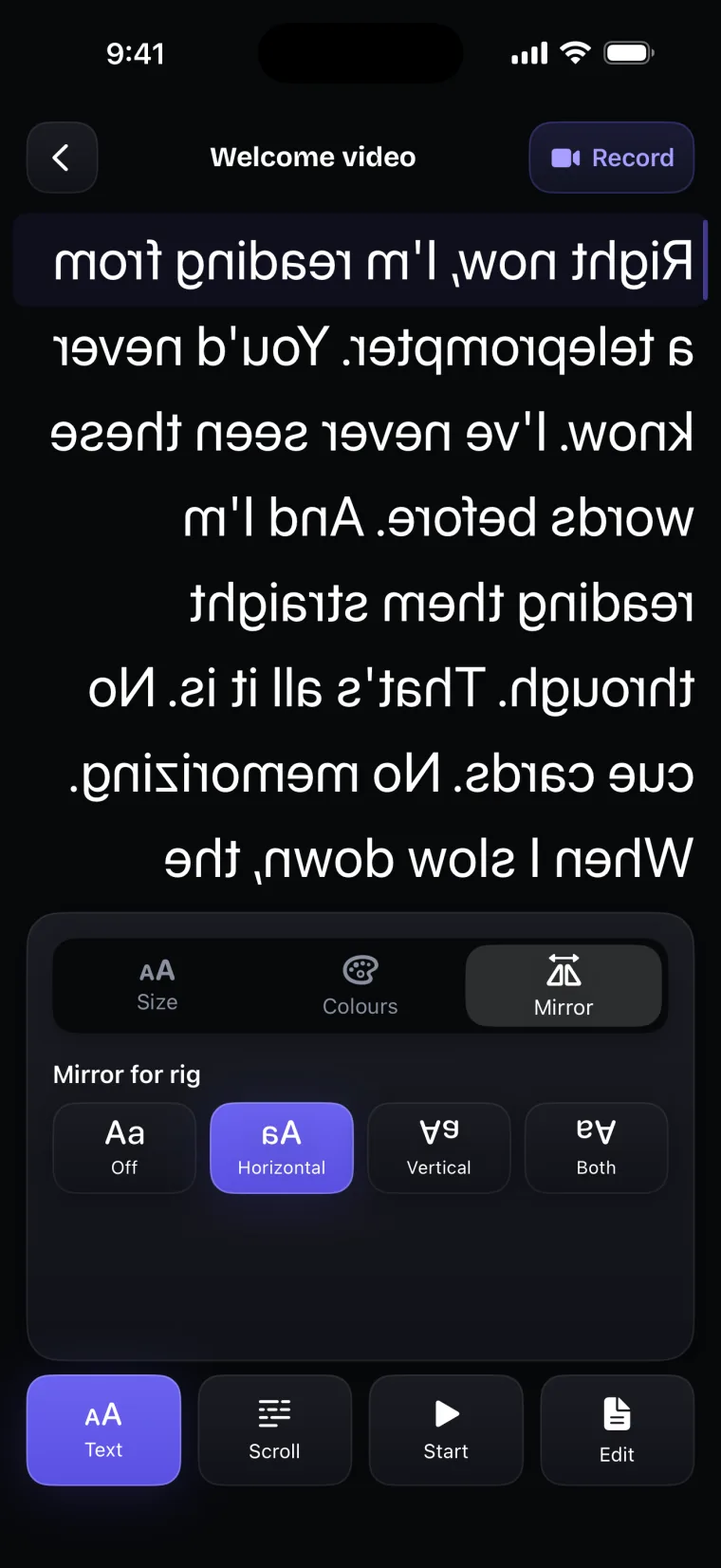
| Teleprompter: Video & Captions | Horizontal, Vertical or Both, on the prompter screen only, not while recording | No | No | PDF and plain-text files |
| BIGVU Teleprompter Captions AI | Not stated | Not stated | Not stated | Not stated |
| Prompt+ Teleprompter | Yes | Bluetooth presentation remote, foot pedal, game controller, keyboard, or another Mac or iOS device | Yes | .doc, .docx, .txt, .rtf and .pdf from Dropbox, Google Drive, iCloud or OneDrive |
| PromptSmart Pro – Teleprompter | Yes, inverted text for teleprompter glass | PromptSmart Remote Control, sold in the app or included with the Extended subscription; volume buttons play and pause | Not stated | DOCX, PDF (OCR-scanned), RTF, TXT and Google Docs; import and export with cloud storage |
| SpeakSync | Yes, with inverted colours and a 180-degree rotation | Not stated | Not stated | Word, PDF, rich text, plain text and web pages |
| Teleprompter.com | Horizontal and vertical | Another device with the app, Apple Watch, Bluetooth keyboards, presentation remotes, game controllers, MIDI controllers and foot pedals | Yes | TXT, Word and PDF from cloud services |
After the take
What happens after the take decides whether you need a second app to finish the video.
| App | Captions | Editing | Where the video goes | Account or sync |
|---|---|---|---|---|
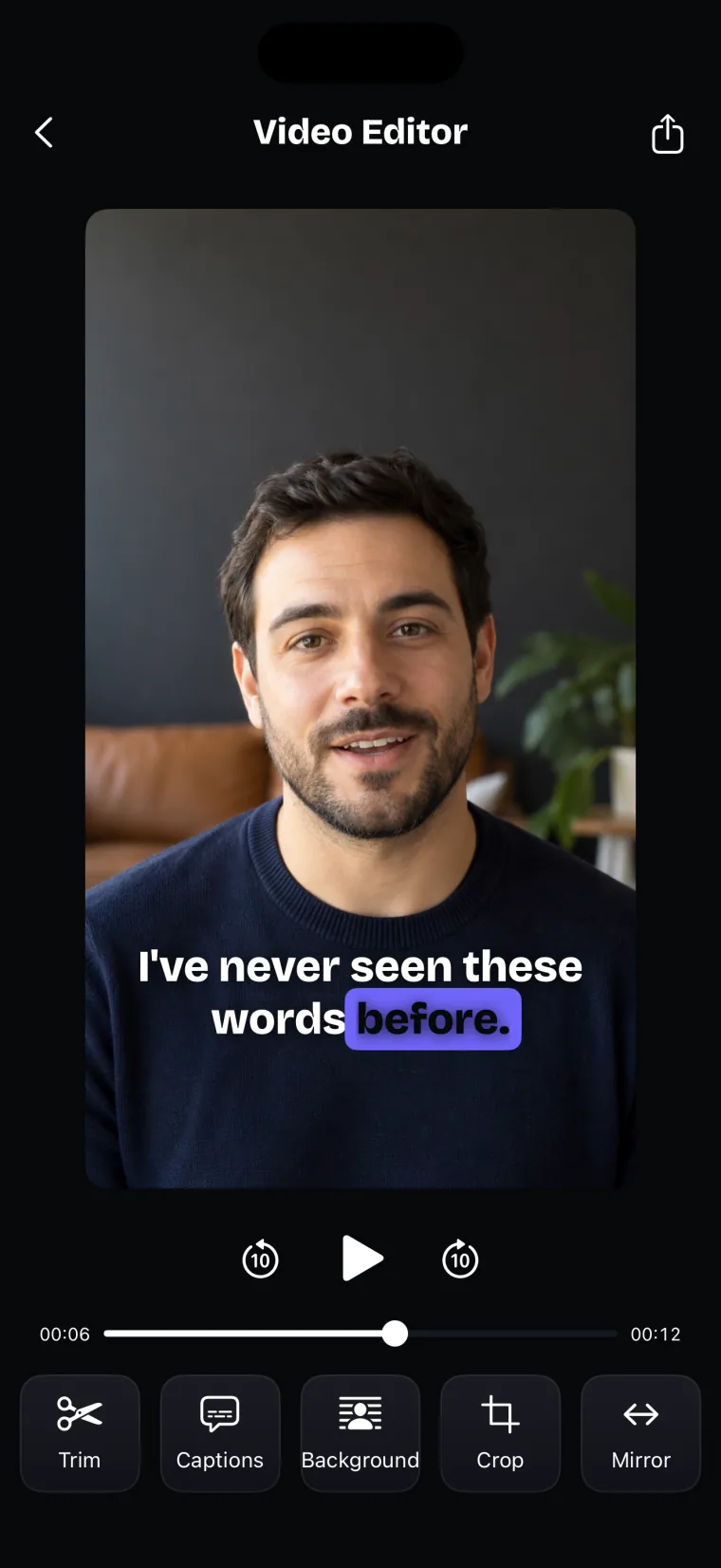
| Teleprompter: Video & Captions | Transcribed from the take and burned in; no subtitle file | Trim and split, crop (Free, 1:1, 4:5, 9:16, 16:9), background blur or replacement, horizontal flip | Saved to Photos; no posting | No account, no sync |
| BIGVU Teleprompter Captions AI | Automatic captions, with themes carrying your logo and colours | Crop to square, vertical or landscape; green-screen replacement; music; eye contact fix | One-click posting to YouTube, Facebook, Instagram and Twitter; camera roll; BIGVU Cloud | BIGVU Cloud, also reachable on the web |
| Prompt+ Teleprompter | Not stated | Not stated | Not stated | Not stated |
| PromptSmart Pro – Teleprompter | Not stated | Not stated; camera controls for focus and exposure | Not stated | File sync with the Extended subscription |
| SpeakSync | Not stated | Not stated | Not stated | Optional iCloud sync of scripts |
| Teleprompter.com | Subtitles generated from the script | Trim, intros and outros, background replacement and blur, framing, noise removal | Not stated; the listing mentions live streaming | Sign-in across devices |
Price and requirements
The price shape matters more than any one price, because prices change and differ by country.
| App | Price shape | Minimum iOS |
|---|---|---|
| Teleprompter: Video & Captions | Free to download; a subscription unlocks your own scripts and projects | iOS 17 |
| BIGVU Teleprompter Captions AI | Free to download; premium features need a subscription | iOS 16.6 |
| Prompt+ Teleprompter | Free to download; scripts of up to 750 characters cost nothing, longer scripts need a one-off in-app purchase, no subscription | iOS 14.0 |
| PromptSmart Pro – Teleprompter | Paid download, with an optional Extended subscription, monthly or annual | iOS 16.0 |
| SpeakSync | Free to download; SpeakSync Pro subscription, monthly or annual | iOS 17.0 |
| Teleprompter.com | Free to download; one Pro subscription across iPhone, iPad and Mac | iOS 15.0 |
A listing that does not mention a feature is not proof that the app lacks it. Listings and prices change, so check the App Store page before you decide.
Where each fits
Each app below is described by the setup it suits, with what its listing does not state. The facts about the other apps are from their App Store listings, read 2026-10-27.
Teleprompter: Video & Captions
Teleprompter: Video & Captions fits when the iPhone or iPad is the camera and the video needs captions and a trim before it goes out. The script sits in a window over the front-camera picture, close to the lens, and either scrolls at a set speed or follows your voice in nine languages (how voice scroll works in this app). Speech is recognised on the iPhone when Apple has an on-device model for the language, and by Apple’s speech recognition service otherwise. After the take, the editor trims and splits, crops, blurs or replaces the background, flips the video, and adds captions transcribed from the take, which take the script’s spelling where the words match; see caption editing in detail. The prompter screen also mirrors the script for a rig, with mirror settings for rigs.
It records with the front camera only, adds captions only to videos recorded in the app, and saves finished videos to Photos; it does not post to social networks or export subtitle files. It also has no support for remotes or foot pedals, no countdown before recording, no Word import, no cloud sync or account, and no green-screen (chroma key) removal. Mirroring works on the prompter screen only, not while recording, so in a rig it needs a separate camera. Voice tracking in Spanish and Portuguese uses Apple’s speech models for Spain and Portugal. The About page lists the facts about the app and their sources.
BIGVU Teleprompter Captions AI
BIGVU Teleprompter Captions AI fits a team that wants branded videos posted to social networks from one app (App Store listing, read 2026-10-27). The listing describes recording with the prompter on screen using the front or rear camera, an adjustable scrolling speed, an eye contact fix, manual exposure, audio monitoring while recording, and several takes to choose from. After recording, it lists automatic captions with themes that carry your logo and colours, cropping to square, vertical or landscape, replacing a green-screen background with an image or a video loop, music, an online editor, and one-click posting to YouTube, Facebook, Instagram and Twitter. Its listing does not state voice tracking, mirroring for a rig or remote control; Apple’s product page lists game controller support without saying what a controller does in the app. It is free to download, and premium features need a subscription.
Prompt+ Teleprompter
Prompt+ Teleprompter fits rig and stage work with a separate camera, where a remote and scripts in cloud storage matter, and where you would rather not subscribe (App Store listing, read 2026-10-27). The listing describes scrolling by voice recognition or by speed control, mirrored text for a physical teleprompter, a countdown, an on-screen clock, rich-text formatting, portrait and landscape, and settings for the font size, colours, alignment and width of the text. It imports .doc, .docx, .txt, .rtf and .pdf scripts from Dropbox, Google Drive, iCloud or OneDrive, and takes remote control from a Bluetooth presentation remote, a foot pedal, a game controller, a keyboard, or another Mac or iOS device. On compatible iPads it can overlay the script on a Zoom call, so the script scrolls next to the camera. The listing does not state video recording, captions, or the languages of its voice recognition. It is free to download; the listing says scripts of up to 750 characters cost nothing, longer scripts need a one-off in-app purchase, and there is no subscription.
PromptSmart Pro – Teleprompter
PromptSmart Pro – Teleprompter fits a reader who wants voice tracking in English, works with many file formats, and wants a remote control from the same developer (App Store listing, read 2026-10-27). The listing describes VoiceTrack, scrolling by speech recognition that follows the speaker and holds its place when the speaker goes off script, and states that VoiceTrack supports English only. It lists inverted text for teleprompter glass, narrower side margins, a Selfie Mode that records video with the text next to the camera, camera controls for focus and exposure, import of DOCX, PDF (OCR-scanned), RTF, TXT and Google Docs files, import and export with cloud storage, and play and pause with the volume buttons. The listing recommends an external wired microphone with VoiceTrack and about 30 minutes of continuous VoiceTrack use, which it says is not a strict cap. It is a paid download, with an optional Extended subscription that adds a remote control, file sync and Scroll Assist; the remote can also be bought on its own. Captions, editing and posting are not stated.
SpeakSync
SpeakSync fits a speaker who reads from an iPhone or iPad and wants voice tracking in many languages with nothing to touch during a read (App Store listing, read 2026-10-27). The listing describes voice-tracked scrolling that waits when you stop and picks up when you return to the script, speech recognition that runs entirely on the device, mirroring with inverted colours and a 180-degree rotation for beam-splitter setups, manual scrolling, a long press to move voice tracking to another place in the script, a rehearsal mode with a timer, optional iCloud sync, and import from Word, PDF, rich text, plain text and web pages. It says the app works in more than 30 languages, without listing which languages voice tracking supports. Video recording, captions, a fixed-speed scroll and remote control are not stated. It is free to download, with a SpeakSync Pro subscription, monthly or annual, sold in the app; the listing does not state what Pro adds.
Teleprompter.com
Teleprompter.com fits a setup that spans several devices or needs a particular kind of remote, and a person who wants prompting, recording and editing under one subscription on iPhone, iPad and Mac (App Store listing, read 2026-10-27). The listing describes VoiceGlide voice scrolling, an adjustable speed and timed scrolling, horizontal and vertical mirroring, a countdown, a remaining-time indicator, accessible fonts, recording with a switch between the front and rear cameras during a recording, pause and resume, trimming, intros and outros, background replacement and blur, noise removal, subtitles generated from the script, and AI help to rephrase lines. Remote control works from another device running the app, an Apple Watch, Bluetooth keyboards, presentation remotes, game controllers, MIDI controllers and foot pedals. It imports TXT, Word and PDF scripts from cloud services and signs in across devices. The languages of its voice scrolling and posting to social networks are not stated. It is free to download, with a Pro subscription.
If you do not want to pay
Every app in the tables except PromptSmart Pro is free to download, but what works without paying differs (App Store listings, read 2026-10-27).
- Prompt+ Teleprompter says scripts of up to 750 characters cost nothing, and longer scripts need a one-off purchase.
- BIGVU, SpeakSync and Teleprompter.com sell subscriptions in the app. Their listings do not set out exactly what works without one.
- Teleprompter: Video & Captions. Teleprompter: Video & Captions is free to download; a subscription unlocks your own scripts and projects, and prices are shown in the app before you pay. Without a subscription, some installs can try every tool on one sample script of up to 100 words, and others need a subscription before they can use the app.
Two apps outside the tables are relevant here. Veritake AI Video Teleprompter is an iPhone app whose listing says every feature is included, with no in-app purchases or subscriptions. It follows your voice with Apple’s on-device speech model, scrolls at a steady speed you set when voice following is not available for your language, records takes in portrait or landscape, and requires iOS 26 or later (App Store listing, read 2026-10-27).
CapCut is a video editor that is free to download (App Store listing, read 2026-10-27) and has a Teleprompter in its mobile app. CapCut’s help article says the Teleprompter is opened from the recording screen, shows the scrolling text over the camera view, uses the front camera by default and can switch to the rear camera, and is not available on CapCut’s desktop or web versions or in the timeline editor (CapCut Help Center, article dated 2026-02-03, read 2026-10-27). The article does not mention voice tracking, mirroring, or speed and size settings.
Methodology
This comparison was put together from public sources, and the list below says exactly which ones and what was not done.
- What was read. For each of the other five apps, the App Store listing in the US store on 2026-10-27: the description, price, version and minimum iOS from Apple’s lookup data, and the subtitle, in-app purchases and compatibility from the public product page. Veritake’s listing and CapCut’s listing and help article were read the same day.
- What “not stated” means. The listing does not mention the feature. That is not evidence that the app lacks it, because listings leave things out.
- Where the facts about Teleprompter: Video & Captions come from. From the app itself, version 2.1, checked against its code and its App Store listing. A listing is the developer’s own description and can say more or less than the app does. That applies to ours too, so this page describes our app from the app rather than from its listing.
- What was not done. None of the other apps was installed or tested. Nothing on this page is a test result, an accuracy figure or a timing. Ratings, review counts and download numbers were not used.
- No ranking. The apps are built for different setups, so the page sets out the criteria and lets you choose.
- Changes. Features and prices change after the review date. Names and trademarks belong to their owners and are used only to identify the apps.
For how the two scroll modes behave, read voice tracking and fixed speed explained.
Corrections
If a fact on this page is wrong or out of date, including a fact about another developer’s app, write through the support page. Developers of the apps listed are welcome to send corrections. A correction is made on the page rather than removed quietly, and the Last reviewed date changes with it.
Questions people ask
What is the best teleprompter app for iPhone?
No single app suits every setup, so this page does not name one. If the iPhone is your camera, look at apps that record with the script on screen, such as Teleprompter: Video & Captions, BIGVU, PromptSmart Pro in its Selfie Mode, and Teleprompter.com. If a separate camera films through a rig, look at mirroring and remote control, which Prompt+ Teleprompter, PromptSmart Pro and Teleprompter.com list. If you need captions in the same app, compare the captions column in the tables above.
Which iPhone teleprompter apps follow your voice?
Of the apps on this page, Teleprompter: Video & Captions, Prompt+ Teleprompter, PromptSmart Pro, SpeakSync and Teleprompter.com describe voice-following scrolling; BIGVU’s listing does not state it (App Store listings, read 2026-10-27). The languages differ: PromptSmart Pro’s listing says English only, Teleprompter: Video & Captions follows nine languages, SpeakSync says it works in more than 30 languages without listing them, and the others do not state theirs.
Which teleprompter apps record video with the script on screen?
Teleprompter: Video & Captions, BIGVU, PromptSmart Pro in its Selfie Mode, and Teleprompter.com describe recording video with the script on screen (App Store listings, read 2026-10-27). Teleprompter: Video & Captions records with the front camera only, while BIGVU and Teleprompter.com list front and rear cameras. The listings of Prompt+ Teleprompter and SpeakSync do not state video recording.
Is there a teleprompter app for iPhone that is free to download?
Yes. Every app on this page except PromptSmart Pro is free to download, and so are CapCut, which has a teleprompter on its recording screen, and Veritake, whose listing says it has no in-app purchases or subscriptions (App Store listings and CapCut Help Center, read 2026-10-27). What works without paying differs: Prompt+ Teleprompter asks for a one-off purchase for scripts over 750 characters, and the others sell subscriptions. Teleprompter: Video & Captions is free to download; a subscription unlocks your own scripts and projects.
How was this comparison made?
From each app’s App Store listing in the US store, read on 2026-10-27, and from the app itself for Teleprompter: Video & Captions, version 2.1. None of the other apps was installed or tested, and the page does not rank them. Where a listing does not mention a feature, the tables say “Not stated”.