
Which real estate videos need a script
Real estate videos are made of two kinds of footage: the parts where you talk to the camera, and the parts where the camera shows a property. The talking parts are the ones a script helps with, because they carry facts, names and a way to contact you that have to be said correctly.
| Video | What it says | Where you might use it | Script |
|---|---|---|---|
| Agent introduction | Who you are, the area and clients you work with, how to reach you | Your website and your profile pages | A short script you read to camera |
| Listing opener and closer | Where the home is and what stands out at the start; how to book a viewing at the end | The listing page and posts about the property | A short script for each; the walkthrough between them is not scripted |
| Market update | What changed in your area, and where the figures come from | Posts and email newsletters | A script, because figures have to be exact |
| Answer to a common question | One question buyers or sellers ask you, and your answer | Posts and your website | A short script or a few notes |
Short scripts work for all of these. If you are new to writing them, the guide on writing a short script that holds attention covers the structure, and the guide on scripting short videos about a business covers videos about the business behind the agent.
An intro script outline
An agent introduction can follow four lines. Replace each part in brackets with your own details, say the result out loud, and change any word you would not say in conversation.
- “Hi, I’m [your name], a real estate agent with [brokerage] in [area].”
- “I mostly work with [who you help], and I [one thing you do for them].”
- “[One specific thing about the area that your clients often ask about].”
- “If you’re thinking about [buying or selling] in [area], [how to reach you].”
Line 3 is the one that makes the video yours. A detail you know from working in the area says more about you than a general claim about service. Leave out claims you cannot back up, such as being the top agent in an area, unless your brokerage has the figures and allows the claim.
Use the same contact details in the video as on your website and your profile pages, so people who watch it reach you the way you expect.
Recording at a property
Recording at a property means working with whatever room you are in, often between appointments.
- Sound. Empty rooms echo, and air conditioning, fridges and traffic all end up in the take. Record in a furnished room if there is one, stand close to the phone, and turn off what you can.
- Light. Face the window. A bright window behind you turns your face dark.
- Holding still. Reading while you walk is hard, so stand still for the talking parts, with the phone on a tripod or held steady at eye level.
- Portrait or landscape. The recorder in Teleprompter: Video & Captions works with the phone upright or on its side. Upright, the script hangs from the top edge just under the front camera; on its side, the script fills the left half of the screen and the controls stand on the right.
Voice mode and Auto mode behave differently in a noisy house. Voice mode follows your words through Apple’s speech recognition, and how well it hears you over noise depends on that recognition, not on the app. If voice following cannot start, or stops during a take, the take carries on at the scroll speed you set. In a loud room, Auto with a speed you have tried with the Test button is the steadier choice, and setting a speed is worth doing even when you plan to use Voice.
Listing videos: the talking parts and the walkthrough
A listing video made on one phone is easiest to plan as three pieces.
- The opener. You on camera with the front camera, reading a few sentences: where the home is, what kind of home it is, and the one thing that stands out.
- The walkthrough. The rooms, filmed with the phone’s back camera in the iPhone’s Camera app or another camera app. It needs no script.
- The closer. You on camera again, saying how to book a viewing or get in touch.
Teleprompter: Video & Captions records the opener and the closer. Save both to Photos, then put them together with the walkthrough in a video editor.
Every fact said in a listing video, such as the price, the size, the number of rooms and what is included, has to match the listing. Put those facts in the script exactly as they appear in the listing, and check the script against it before you record. Advertising rules for licensed agents differ from place to place, so check your brokerage’s rules and your licensing body’s rules before you post.
Captions and finishing
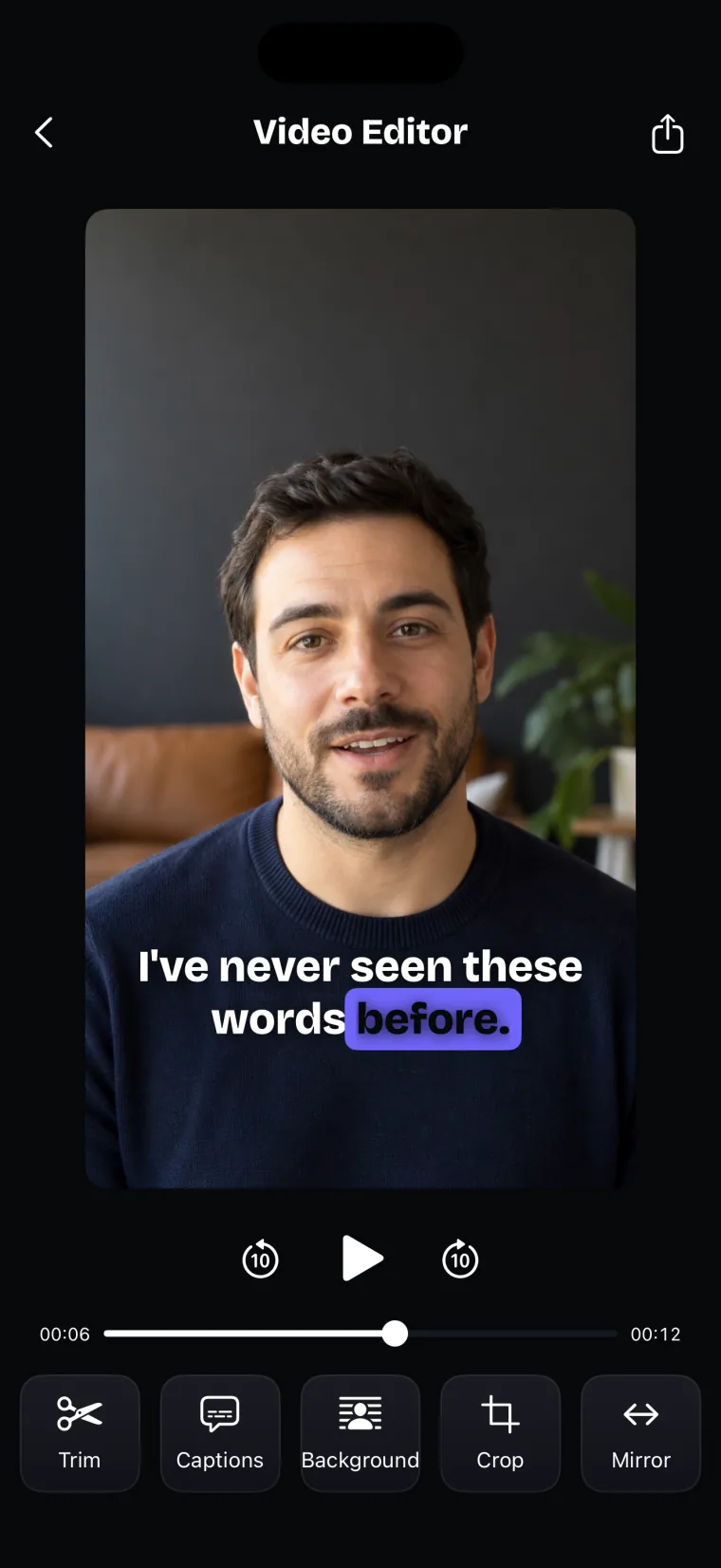
Captions in Teleprompter: Video & Captions come from the take’s own audio. You pick the spoken language, the app transcribes the take, and the captions appear on the video. Where a word it hears is the same word as in your script, the caption uses the script’s spelling, capitals and punctuation, so a name typed correctly in the script is spelled the same way in the caption, as long as the speech recognition heard that word.
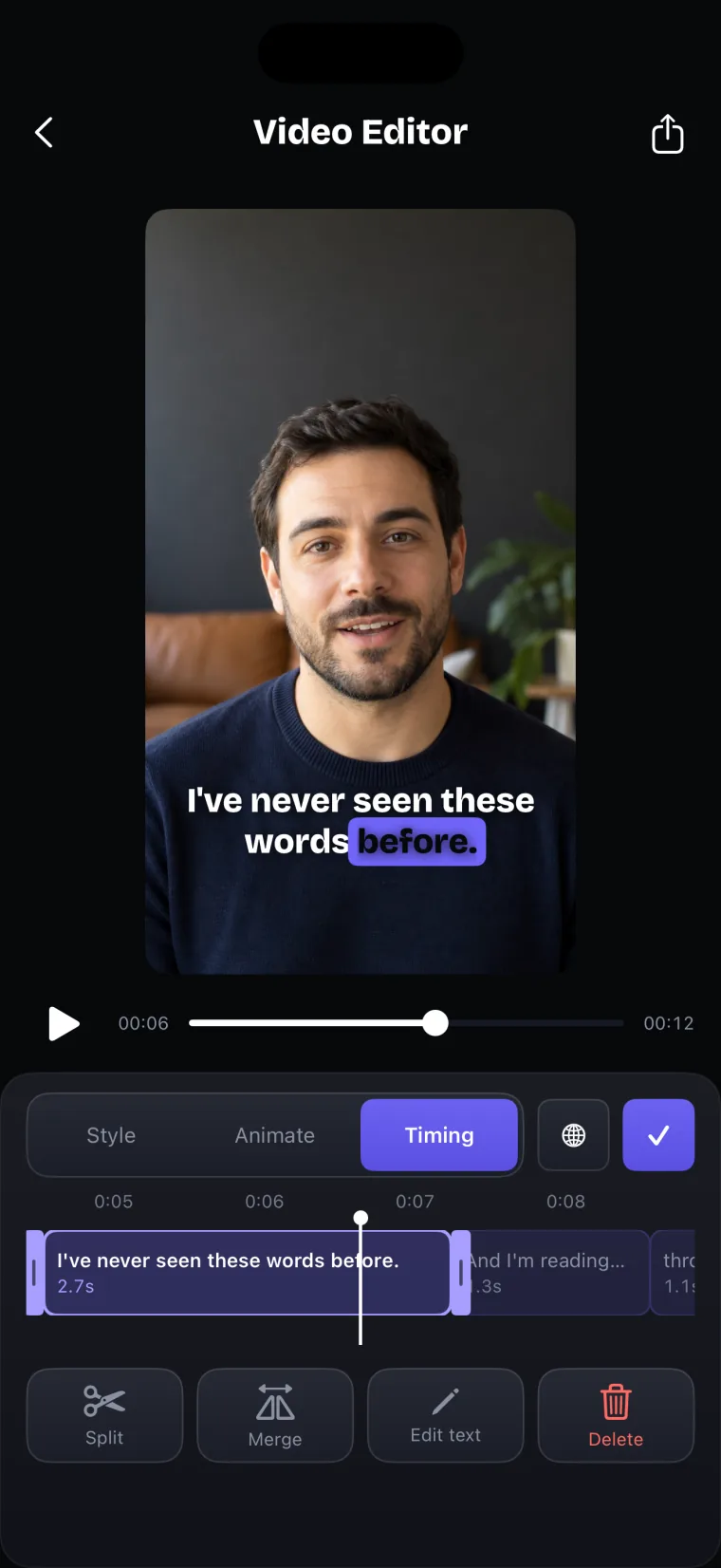
Street names, neighborhood names and family names need checking in the captions. If the speech recognition hears an unusual name as a different word, the script’s spelling does not apply, and the caption stays wrong until you fix it. The Timing tab lets you edit a caption’s text, split it, merge it with the next one, or delete it. The guide on adding captions on the iPhone goes through the whole caption process.
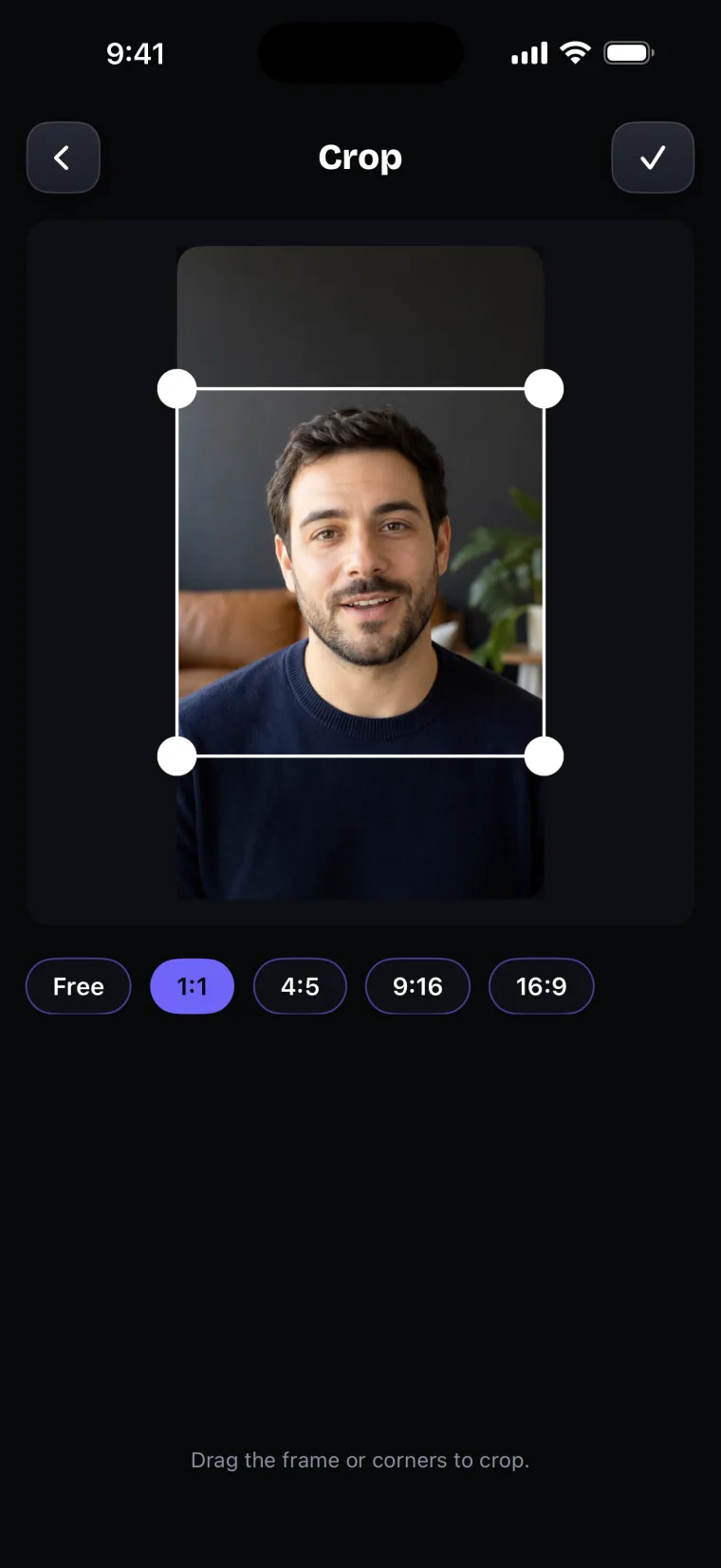
The other tools in the editor are for cropping and finishing the take. Crop offers Free, 1:1, 4:5, 9:16 and 16:9. Background can blur what is behind you or replace it with a picture; for a listing opener filmed in the home, leave it on Original, because the room is part of what you are showing. Saving with the share icon burns the captions into the video and puts it in Photos.
Where this stops working well
Teleprompter: Video & Captions covers part of a real estate video, not all of it. It records with the front camera only, adds captions only to videos recorded in the app, and saves finished videos to Photos; it does not post to social networks or export subtitle files.
- No walkthrough. The app does not record with the back camera; film the rooms in the iPhone’s Camera app or another camera app.
- No captions on the walkthrough. A clip filmed in another app cannot be brought into the app; caption it in the video editor you use to join the parts.
- No logos or branded intros. The app has no logos, brand templates or intro screens; add your logo and brokerage details in a video editor.
- No posting. The finished video goes to Photos, and you post it from there.
Questions people ask
What should a real estate agent say in an introduction video?
Say who you are and which brokerage you work with, the area and the clients you work with, one specific thing you know about the area, and how to reach you. A few sentences are enough. Write them down, say them out loud, and change anything that does not sound like you.
Can I film a property walkthrough in Teleprompter: Video & Captions?
No. Teleprompter: Video & Captions records with the front camera only, which suits the parts where you talk to the camera. Film the walkthrough with the back camera in the iPhone’s Camera app or another camera app, and join the parts in a video editor.
Should real estate videos be vertical or horizontal?
Match the shape to where the video will be watched. Vertical fits apps that play video full screen on a phone held upright; YouTube’s help page on uploading Shorts asks for a square or vertical video of up to three minutes (YouTube Help, read 2026-10-27). Horizontal fits a website or a video watched on a computer or television. The app records either way and can crop to 9:16, 4:5, 1:1 or 16:9 afterwards.
Do real estate videos need captions?
Captions are not required, but they let people follow the video when they cannot turn the sound on, and they help viewers who are deaf or hard of hearing. They also show names and figures in writing, which helps when the details matter. Check the spelling of street and area names before you save the video.